Video editor
A free video editor made for screen recordings.
General video editors treat a screen recording like any other clip, so every zoom and every caption is manual work. Shotnix saves where your pointer went and where you clicked, then opens the recording in an editor built around that: the zooms are already placed, the cursor is redrawn smooth and sharp, and captions are one click away. It is free, runs on your Mac, and never watermarks your video.
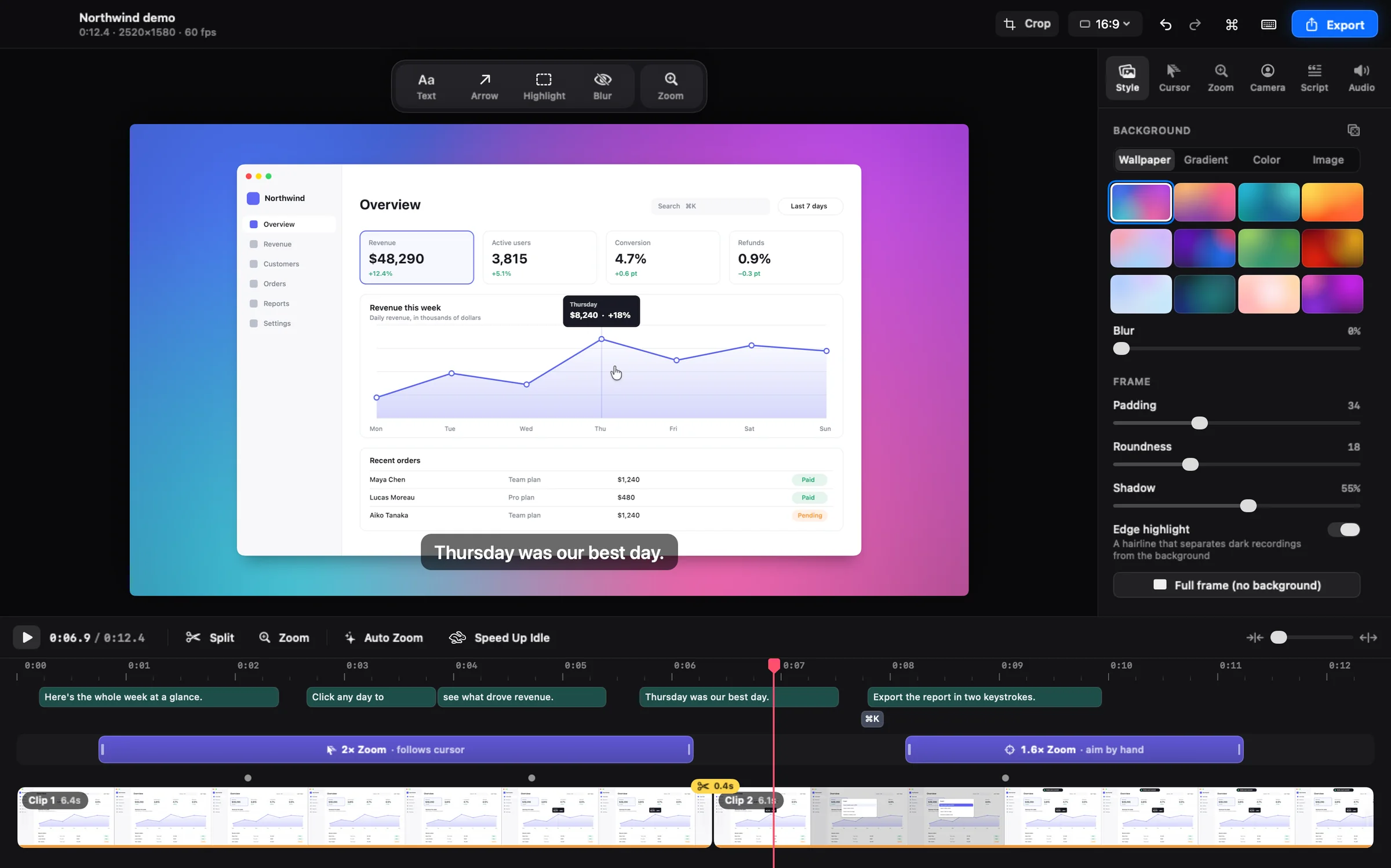
A screen recording editor for Mac, not a general video editor
The layout is built for demos: a big preview, a dock of tools above it, an inspector with Style, Cursor, Zoom, Camera, Captions, and Audio tabs, and a full-width timeline. One renderer draws both the preview and the export, so what you see while editing is exactly what ends up in the file.
Zooms and cursor polish, done before you start
Fresh recordings open already produced. Auto Zoom gives each burst of clicks its own zoom, timed so the view arrives before the click. Zooms are blocks on the Zoom track: press Z to add one, drag to move it, drag an edge to change its length. Zooms close together chain into one smooth pan instead of bouncing in and out.
- The real macOS cursor is captured, then redrawn crisply at any size from 0.6× to 4×.
- Smoothing: Off, Light, Smooth, or Silky. Even Silky lands exactly on every click.
- Motion blur, click effects (a ripple or a press), hide when idle, always show the arrow, and hide the final move to the Stop button.
Cut the waiting, keep the point
- Press S to split at the playhead, drag a clip's edges to trim, and drag clips to reorder them.
- ⇧-drag across the timeline to select a range, then cut it, or give just that part its own speed or mute.
- Select several items with ⇧- or ⌘-click and move or delete them together.
- Set speed per clip from 0.5× to 16×, with per-clip mute and fades.
- Speed Up Idle fast-forwards stretches where nothing happens, and leaves typing, scrolling, and keyboard shortcuts alone.
- Markers show where material was removed. Click one to put it back.
- Undo covers every edit and says what it undoes, such as Undo Delete Zoom. Drafts save automatically, and Start over from the original recording is in the command palette (⌘K).
- Keyboard-first: Space to play, J, K, and L to shuttle, arrow keys to step frames, I and O to trim, M to mute the preview, ⌘E to export, and ? for every shortcut.
Music, title cards, transitions, and more recordings
- Background music with volume, fades, looping, and a start point. It dips under your voice automatically, detected on your Mac, and plays across the title cards.
- Intro and outro title cards on your project's background.
- Transitions: Dissolve or Dip to black between clips, for every cut or one at a time, plus fades in from and out to black.
- Several recordings in one video: append more, then reorder or remove them. Each keeps its own cursor, clicks, shortcuts, and camera.
Captions and edit by text, made on your Mac
The Captions tab transcribes your narration on your Mac, with every word timed. Nothing is uploaded, and only your voice is transcribed, not music or your Mac's sound. Turn the transcript into captions in one of four looks, with words that light up as you speak, and save .srt or WebVTT subtitles that match your edit. On macOS 15 and later, you can translate the captions on your Mac too.
Or edit the video by editing the words: select a sentence and press Delete to cut it. Remove ums cuts filler words in one click, and Shorten pauses trims long silences, but only where nothing happens on screen, so clicking, typing, and scrolling are never cut.
Your webcam as its own layer
Turn on the camera before recording and it is saved as a separate track. In the editor, pick a circle, rounded, wide, or cutout bubble, blur or remove what's behind you, and drag it to any of eight spots. Camera layouts switch between full camera, side by side with the screen, and hidden, each easing in and out. One click adds a full-camera intro and outro.
Backgrounds, vertical video, and crop
- Backgrounds: 12 wallpapers, 8 gradients, solid or custom colors, your own image, or your Mac's desktop pictures, with blur, padding, rounded corners, shadow, and an edge highlight. Full frame drops the background.
- Save a look once and every new recording starts with it.
- Aspect ratios: Auto, 16:9, 4:3, 1:1, 4:5, and 9:16. A landscape recording switched to 9:16, 4:5, or 1:1 fills the frame and pans to follow your cursor.
- Crop with Free, 16:9, 4:3, 1:1, or 9:16 locks. The cursor, clicks, and zooms follow the crop.
Text, arrows, spotlights, logos, and blur
Add text, an arrow, a highlight, a blur, or a spotlight from the dock, or press T, A, H, or B. Each lands at the playhead; drag and resize it on the preview, and set its timing with its bar on the timeline. Arrows point any way you drag them, text has its own size control, and a spotlight dims everything around a rectangle or an ellipse. Use any color and a thin, regular, or bold line. Blur keeps private details hidden even through zooms.
Put your logo, a watermark, or a screenshot over the video with Image: place it, resize it, set its opacity, snap it to a corner, and time it on the timeline.
Sound that is easy to listen to
When you record both your microphone and your Mac's sound, each gets its own level. Enhance voice removes background noise and hum and evens out your level, processed on your Mac. Even out loudness makes the export land at −16 LUFS without clipping.
Background music dips under your voice on its own, and click sounds are there if you want them. M mutes the preview while you edit; exports keep their sound, and the export sheet warns you if one would be silent.
Export MP4, GIF, or straight to the clipboard
- MP4 at 720p, 1080p, 1440p, or 4K; 24, 30, or 60 fps; Web, Social, or Studio quality; H.264 or HEVC, hardware-encoded.
- The exact pixel size and an estimated file size show before you export, with a warning if the output is larger than the recording.
- GIF in small, medium, or large, at 10 to 24 fps.
- Or choose Copy to export straight to the clipboard, ready to paste into a chat or an email.
- Exports run in the background: progress and Cancel sit in the toolbar, exports queue up, and you keep editing while they render.
- Export a selection or an In/Out range, then open the macOS Share menu or show the file in Finder straight away.
- Recent Exports are in the File menu and the command palette, and exports are named after the recording, such as Demo (edited).mp4.
What to know before you start
- Shotnix runs on Apple silicon Macs (M1 or later) with macOS 13 Ventura or newer. Intel Macs are not supported.
- Auto Zoom, zooms that follow the cursor, the redrawn cursor, and Speed Up Idle use the pointer data Shotnix records (Settings → Recording → Editable cursor, on by default). Videos from other apps edit fine, but you aim their zooms by hand.
- On macOS 13 to 15, captions need the language's on-device dictation model. On macOS 26, Shotnix uses Apple's newer speech model, downloaded once.
- Translating captions needs macOS 15 or later, with the language installed in System Settings.
- There is no cloud and no share link. You export a file or copy it to the clipboard.
How to do it in Shotnix
- Record, or open a videoStop a Shotnix recording and the editor opens with Auto Zoom applied. Open other videos with Open With in Finder or by dropping them on the app.
- Tighten the timelinePress S to split, drag clip edges to trim, drag clips to reorder them, and run Speed Up Idle to fast-forward the waiting.
- Check the zooms and cursorDrag zoom blocks to adjust them, press Z to add one, and pick a cursor smoothing level.
- Add captions, camera, music, and sound fixesTranscribe in the Captions tab, style your camera bubble, add music, and turn on Enhance voice.
- ExportPress ⌘E for MP4 or GIF, or copy the finished video to the clipboard. It renders in the background while you keep editing.
Questions
Is there a free video editor for screen recordings on Mac?
Yes. Shotnix is free and open source (MIT license), with no account, no subscription, and no watermark. Apple's iMovie is free too, but it is a general editor: it doesn't know where your cursor went or what you clicked, so every zoom is manual.
Does Shotnix put a watermark on exported videos?
No. No frame of your video is watermarked. The only branding is an optional 2-second Made with Shotnix end card after the video, and it is a single switch in the export sheet.
Can I edit a video that wasn't recorded with Shotnix?
Yes. Use Open With in Finder or drop the file on the app. Trimming, speed, backgrounds, annotations, captions, sound, and export all work. Auto Zoom, zooms that follow the cursor, and the redrawn cursor need the pointer data Shotnix records, so on other videos you aim zooms by hand.
Does the editor upload my recordings?
No. Editing, transcription, caption translation, voice cleanup, and export all happen on your Mac. Shotnix has no account, no cloud, and no share links.
Can I add music, a logo, or title cards?
Yes. Add background music that dips under your voice, put a logo, watermark, or screenshot over the video, and add intro and outro title cards. Dissolve and dip-to-black transitions go between clips.
Can I combine several recordings into one video?
Yes. Append recordings from the Style tab, then reorder or remove them. Each keeps its own cursor, clicks, shortcuts, and camera.
Which Macs can run the Shotnix video editor?
Apple silicon Macs (M1 or later) with macOS 13 Ventura or newer. Intel Macs are not supported. On macOS 13 to 15, captions also need the language's on-device dictation model.
Can I export a GIF from a screen recording?
Yes. Choose GIF in the export sheet: small, medium, or large, at 10 to 24 fps. GIF is an export format, so you record normally and make the GIF in the editor.
Try it on your own screen.
Shotnix is free, open source, and local, with no watermark. Download the notarized app, or star the repository to follow along.
11.9 MB · Apple silicon (M1 or later) · macOS 13+ · notarized by Apple · MIT license